Docs
myLinux Launcher is a free Mac app that runs Linux machines, and Windows 11, as QEMU virtual machines on Apple's hypervisor. Each machine has its own disk and runs as an app of its own. This page says what every part does and where to find it, for launcher 0.7.90.
Install
One app of 40 MB, for an Apple-silicon Mac (M1 or newer) with macOS 15 or newer. Nothing else is needed: no Homebrew and no QEMU of your own.
- Download myLinux-Launcher.dmg. It is signed with a Developer ID and notarised by Apple.
- Open it, drag myLinux Launcher to Applications, and open it from there.
- The Welcome sheet lists the Linux machines. Tick the ones you want and press Download.
- Select a machine in the sidebar and press Start.
The QEMU that runs the machines comes inside the app and is installed when the launcher first starts. It is myLinux's own build of QEMU 11.1 (runtime 11.1.1-22), which draws the desktops on the Mac's GPU through Metal. Its sources and licences are listed in the runtime's NOTICES.md.
The Welcome sheet
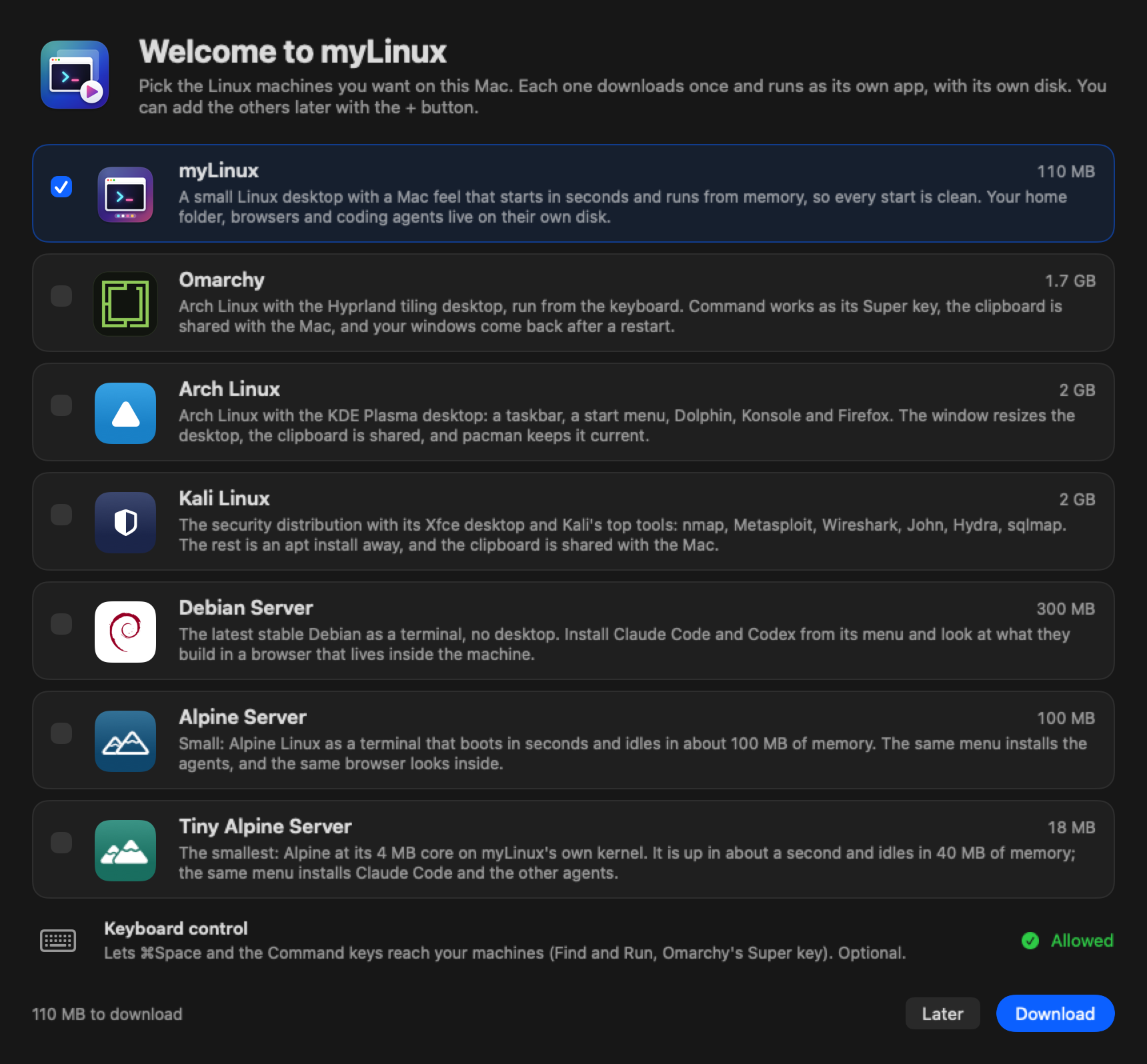
- It opens by itself on a new install (no machines and nothing downloaded), and again at the next start if you quit the launcher while it was open. File › Download Linux… brings it back at any time, and so does the Download Linux… link in an empty sidebar.
- The rows: myLinux 110 MB (ticked to begin with), Omarchy 1.7 GB, Arch Linux 2 GB, Kali Linux 2 GB, Debian Server 300 MB, Alpine Server 100 MB and Tiny Alpine Server 18 MB. A Linux that is on the Mac already says Downloaded.
- Download fetches the ticked ones side by side, with progress on each row and a clock at the top right that estimates the time left. Continue in Background closes the sheet while they go on, Done closes it when they are finished, and Later closes it without downloading.
- When it closes, the launcher adds one machine of each downloaded kind that has none yet and selects the first. A new Omarchy then gets the new-machine dialog for its first-start answers.
- Keyboard control at the foot asks for macOS's Accessibility permission (Allow…). It is optional: it lets ⌘Space reach Find and Run in a server's window, and lets a desktop take every key, ⌘ included.
Windows is not in the Welcome sheet, because Microsoft's ISO is yours to download. Use + › Windows Machine…; see Windows 11.
The first time a machine with sound starts, macOS asks whether myLinux Launcher may use the microphone. The answer is kept in System Settings › Privacy & Security › Microphone; without it a machine plays sound and records silence.
Machines
The launcher's window, myLinux Machines, has a sidebar on the left and the page of whatever is selected on the right.
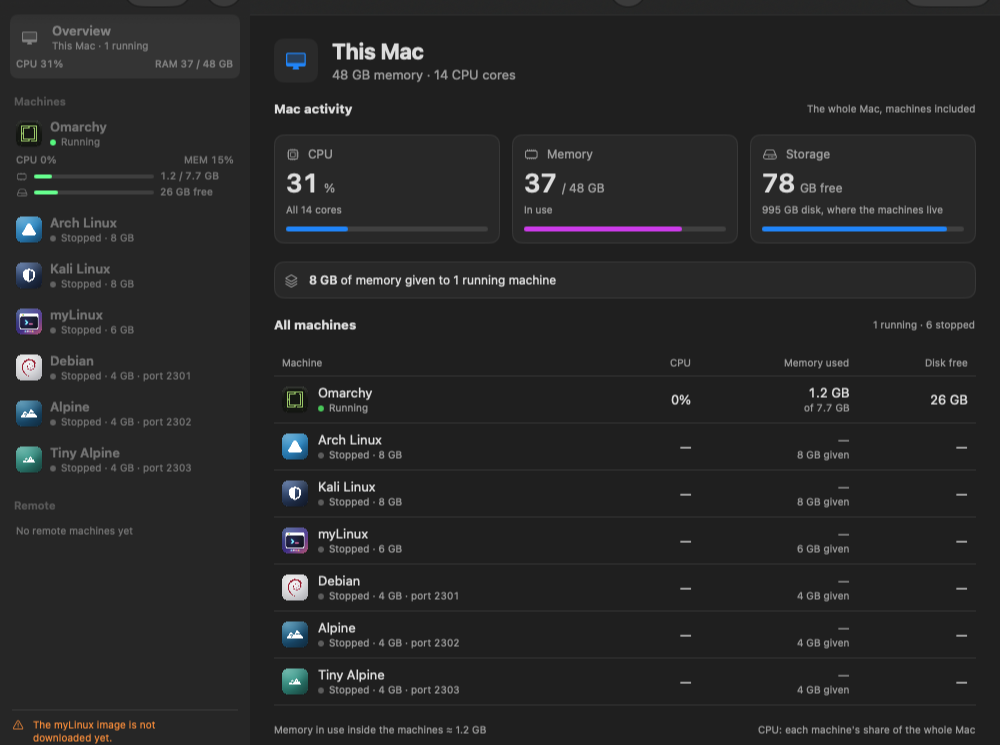
The sidebar and the Overview
- Overview is the whole Mac: its CPU, the memory in use, the free space where the machines live, the memory given to running machines, and a table of every machine with its share of the Mac's CPU, its memory in use and its free disk.
- Machines lists yours. A running machine shows its CPU, memory and disk as bars under its name; a stopped one shows its memory, and a server its SSH port.
- Right-click a machine for Duplicate (a new machine with the same settings and a disk of its own) and Remove.
- Remote lists VNC desktops and SSH terminals on other computers (see Remote VNC and SSH).
- The + above the sidebar adds a machine of any kind, a VNC Desktop or an SSH Terminal, or imports machines.json…. The dot-grid button beside it opens Tailscale.
- The globe in the middle of the toolbar opens your mylinux.app account; the version and the gear for Settings are on the right.
| File › New myLinux Machine ⌘N | A myLinux desktop |
| File › New Omarchy Machine… ⇧⌘N | Omarchy, through the new-machine dialog |
| File › New Arch Linux Machine, New Kali Linux Machine | The two other Linux desktops |
| File › New Windows Machine… | Windows 11, through the new-machine dialog |
| File › New Debian Server ⌥⌘N | A Debian server |
| File › New Alpine Server, New Tiny Alpine Server | The two Alpine servers |
| File › Download Linux… | The Welcome sheet |
| File › Quick Connect… ⌘K | Find any machine by name and open or start it |
| File › Install the Agents' Skill… | The skill for Claude Code and Codex |
A machine's page
- At the top: the machine's icon, its name (edit it while the machine is stopped), its state, and the buttons. While something it needs is missing, Download … (or Get Windows…) stands where Start will be.
- While it runs, Live activity graphs the last 60 seconds of CPU and memory and shows the free disk. A server adds its
sshcommand and whether SSH answers. - Below fold three parts, each remembering whether you left it open: Machine configuration (memory, processor cores, keyboard, screen, disk size, sound, clipboard), Files & sharing (the disk, the share folder, cloud folders) and Console & diagnostics (the serial console, a server's console login, and Show Log).
- Settings can be changed while the machine is stopped.
Each machine is its own app
A machine runs as an app of its own, under the machine's name and with its kind's icon, in the Dock and in ⌘Tab. A desktop is its window; a server is its terminal windows. Keep one in the Dock and a click starts the machine, opening the launcher in the background when needed. Quitting a machine's app leaves the machine running; the app quits by itself when the machine shuts down.
Start, shut down and quit
| Start | Downloads what the kind still needs, then starts the machine. A desktop opens in its window; a server's terminal opens as soon as SSH answers. |
| Terminal, Show Window | Bring a running server's terminal or a desktop's window forward. |
| Restart | Shuts the machine down and starts it again in a new QEMU, so a newer runtime is used. Machine › Restart in a desktop's menu bar does the same; Machine › Reset only reboots the guest in the same QEMU. |
| Shut Down | A clean shutdown, as the machine's own power-off. |
| Force Quit | The power cut, offered while a machine starts or stops. Use it when a machine does not answer. |
Machines are processes of their own and keep running when the launcher quits. With machines running, quitting asks: Shut Down and Quit, Leave Running or Cancel. A launcher started later finds them running and can show, restart or shut them down.
Memory, cores and disks
Memory starts at Automatic: at every launcher start, such a machine is given memory to suit the Mac. A size you pick by hand is kept as it is.
| Omarchy, Arch Linux, Kali Linux, Windows | 4 GB on an 8 GB Mac, 6 GB on a 16 GB Mac, 8 GB on 24 GB or more |
| myLinux | 3 GB, 4 GB, 6 GB |
| Debian, Alpine, Tiny Alpine | 2 GB, 2 GB, 4 GB |
- Processor cores start at Automatic too; a number of cores can be picked instead.
- A disk is a file that grows as it fills. New disks are 32 GB for servers and the Linux desktops, 64 GB for Windows and 16 GB for myLinux's apps disk. The size applies when the disk is made: changing it later affects new disks only.
- Machines live in
~/Library/Application Support/myLinux, one folder per machine. - Remove asks whether to Move to Trash the machine's disk and files or Keep Files. A running machine must be shut down first. A new machine never reuses a removed one's folder.
The new-machine dialog
Omarchy and Windows ask a person questions at their first start. The new-machine dialog takes those answers beforehand, with the machine's name, memory, disk size and shared folder, so the machine sets itself up while you do something else. Two boxes at its foot install Claude Code and Codex too.
- Open it with + › Omarchy Machine… or + › Windows Machine…, or the same items in the File menu.
- A new Omarchy from the Welcome sheet, or a duplicated Omarchy or Windows machine, gets the dialog by itself.
- On the page of a machine that has not started yet, Answer Here… (Omarchy) and Install by Itself… (Windows) open it again.
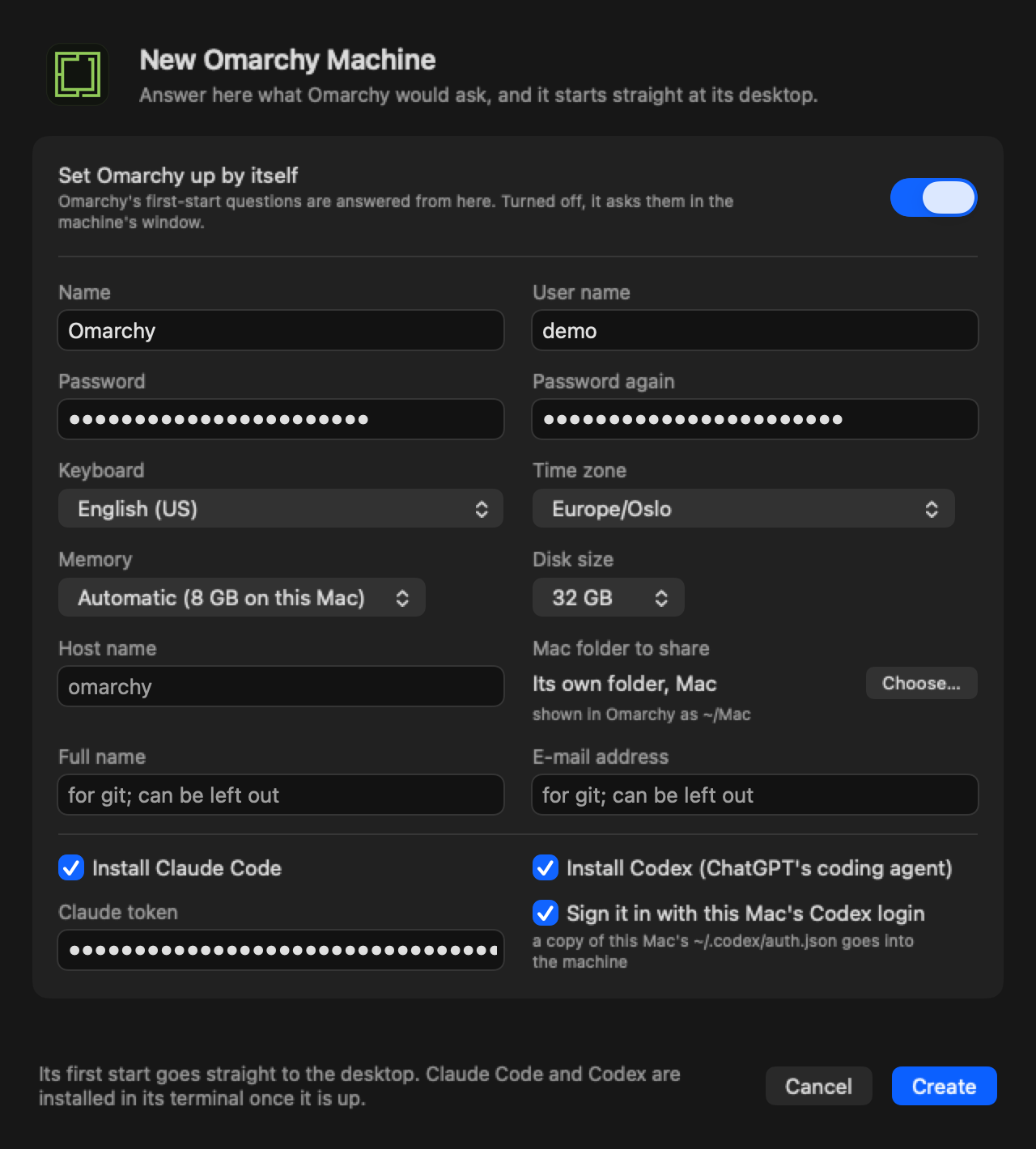
| Set Omarchy up by itself, Install Windows by itself | The switch at the top. On, the answers below are used and the machine needs nothing from you. Off, it asks in its window as before. |
| Name | The machine's name: up to 60 characters, without / or a comma. |
| User name (Omarchy), Account name (Windows) | Suggested from your Mac user name. Omarchy takes small letters; Windows makes it a local administrator. |
| Password, Password again | Omarchy needs one: it is for signing in and for sudo. Windows can do without one, and then signs in by itself. |
| Keyboard | Suggested from the Mac's keyboard layout. |
| Time zone (Omarchy) | The Mac's, to begin with. |
| Edition (Windows) | Windows 11 Pro or Windows 11 Home. |
| Memory, Disk size | Automatic memory, or a size. Disks start at 32 GB for Omarchy and 64 GB for Windows. |
| Host name (Omarchy) | Made from the machine's name when left empty. |
| Mac folder to share (Omarchy) | Its own folder named Mac beside its disk, shown inside as ~/Mac. Choose… picks another, shown as ~/ and that folder's name. System folders, the whole home folder and the Library are refused. |
| Full name, E-mail address (Omarchy) | For git; both can be left out. |
| I accept the Microsoft Software License Terms (Windows) | Yours to switch on, with Read the terms beside it. An install that answers itself cannot go on without it. |
| Install Claude Code, Claude token | Claude Code in the terminal, with its status line. Paste a token from claude setup-token to sign it in, or leave the field empty and sign in inside. |
| Install Codex (ChatGPT's coding agent), Sign it in with this Mac's Codex login | Codex with the alias cx. With the second box ticked, a copy of this Mac's ~/.codex/auth.json goes into the machine; it is greyed out when the Mac has no Codex login. |
The footer says what is still missing; Create makes the machine when the form is complete.
What happens next
- Omarchy with answers goes straight to its desktop at its first start, in about half a minute once it is downloaded. The answers, the password among them, are put into the new disk before it boots, removed from the Mac at that start, and removed from the disk when Omarchy's setup ends. A question Omarchy does not take the answer to is asked in its window after all.
- Claude Code and Codex are set up in an Omarchy's first boot, before its desktop exists, so the first terminal you can open has
cc,cxand, with a token,cc1. Once the machine answers, the launcher checks what is there, adds what needed the network (the status line), and the machine's page says how it went. - Windows with answers installs itself in 15 to 40 minutes, with nothing to answer, and restarts a few times, the last time into the finished machine. Claude Code and Codex are installed once it is installed and signed in.
- Until then the machine's page shows the answers, with Change… and Ask in Its Window Instead (Omarchy) or Answer Windows Setup Myself (Windows), and the boxes' wish with Don't Install.
- A typed token waits in the machine's folder, readable by your Mac user only, and is removed once the setup has run, however it went. Claude Install… and Codex Install… in the machine's ⌘ menu do it again.
The same answers work from the command line: mylinux create omarchy --unattended and mylinux create windows --unattended, then mylinux claude and mylinux codex with --install. See the mylinux command.
The machines
Eight kinds: four Linux desktops, three Linux servers and Windows 11. Every one runs natively on Apple silicon; nothing is emulated. Each kind downloads once, and every machine gets its own disk from that download.
Omarchy
An opinionated Arch Linux with the Hyprland tiling desktop, made to be driven from the keyboard. myLinux runs the guest of the Try Omarchy project's signed ARM64 release (Try Omarchy v0.6.0, Omarchy 4.0.4), checked against a pinned SHA-256, the publisher's signature and the guest's own checksums before it is used. Nothing from it runs on the Mac.
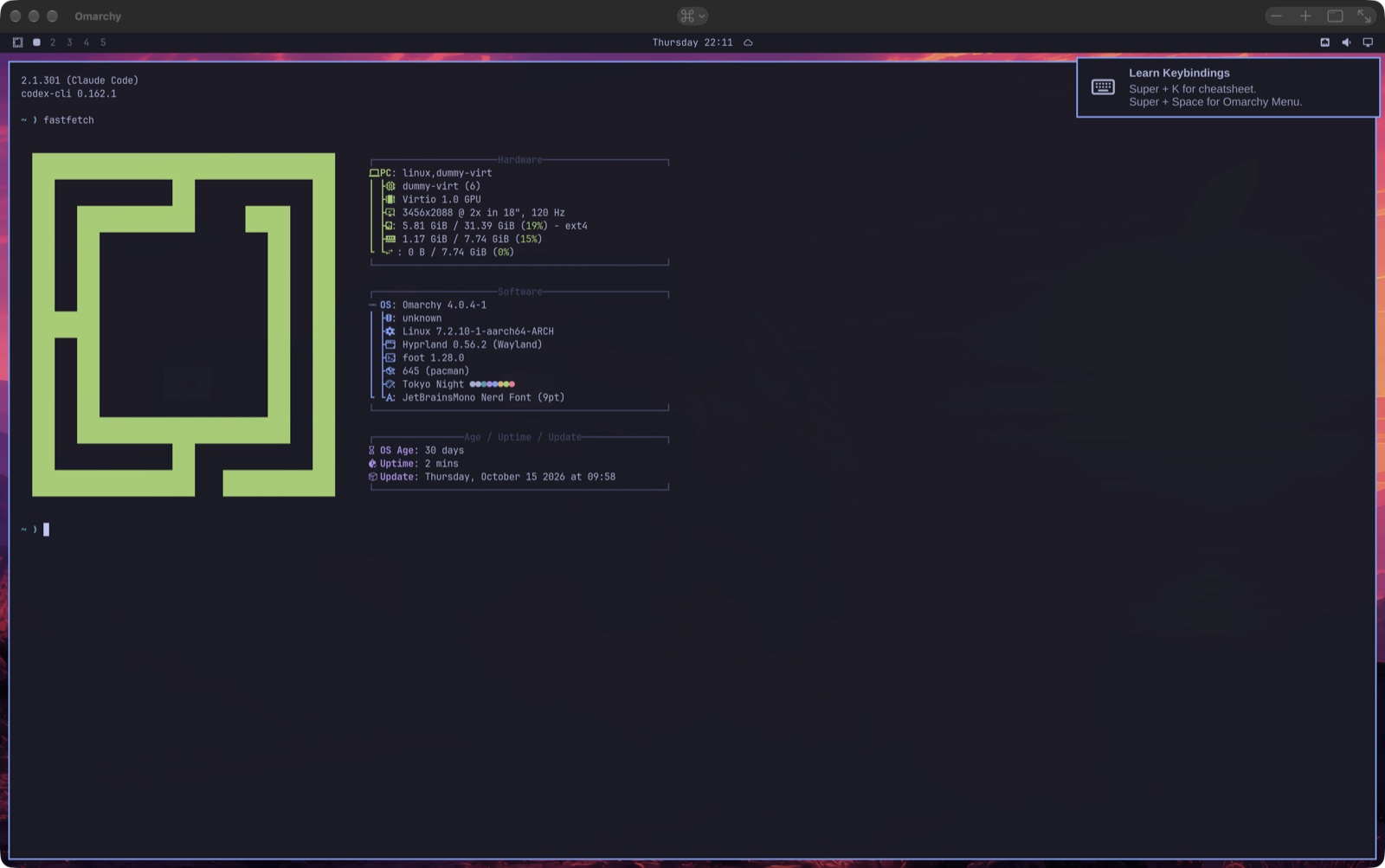
- Signing in: with the account made at its first start, in the new-machine dialog or in its window (keyboard, account and password, a name and e-mail address for git, host name, time zone).
- Keys: every key goes to Omarchy and ⌘ is its Super key, so its own shortcuts work as meant, ⌘Tab and ⌘Space included. CtrlOptionG gives the keyboard back to the Mac (⌘Tab and Spotlight work, typing still reaches Omarchy); a click in the window, or the same keys again, gives Omarchy every key. Machine configuration › Keyboard can make Option the Super key instead, leaving ⌘ to macOS.
- The ⌘ menu in the middle of the title bar: Apps… (⇧⌘A), Claude Install…, Snippets…, Cloud Folders… (⇧⌘P) and Mount a Share…, then Save Session Now, Restore Session and Save Every (off, 1, 2, 5 or 15 minutes).
- Your windows come back after a restart: their layout, each window's command and a terminal's folder are saved every minute and at logout, and reopened on the same workspaces at login. Apps that restore their own state come back whole; terminals come back empty, in the right folder. Inside,
omarchy-session status,save,restoreandintervaldo the same. - Clipboard both ways, text and pictures, through Omarchy's own clipboard agent. Sound through the Mac, its microphone included. Not there: the camera and Touch ID.
- The Mac folder at
~/Mac, or the folder you chose in the dialog. - Apps… opens myLinux Apps in a terminal inside, with Omarchy's packages, a Keyboard group that adds layouts after English (US) (Left Alt and Right Alt together switch), and Claude Desktop.
- SSH from the Mac: Machine configuration › Sound and network › SSH from the Mac (port 2222 to begin with), then
ssh -p 2222 <your Omarchy user>@127.0.0.1, from this Mac only.
Add it with + › Omarchy Machine…, File › New Omarchy Machine… or mylinux create omarchy.

Arch Linux
Arch Linux ARM with the KDE Plasma desktop on Wayland. There is no ready-made Arch desktop for Apple silicon, so myLinux builds one from Arch Linux ARM's own packages, its root filesystem checked against Arch Linux ARM's build key, and publishes it as a release. The launcher downloads the pinned release and checks its files against their checksums.
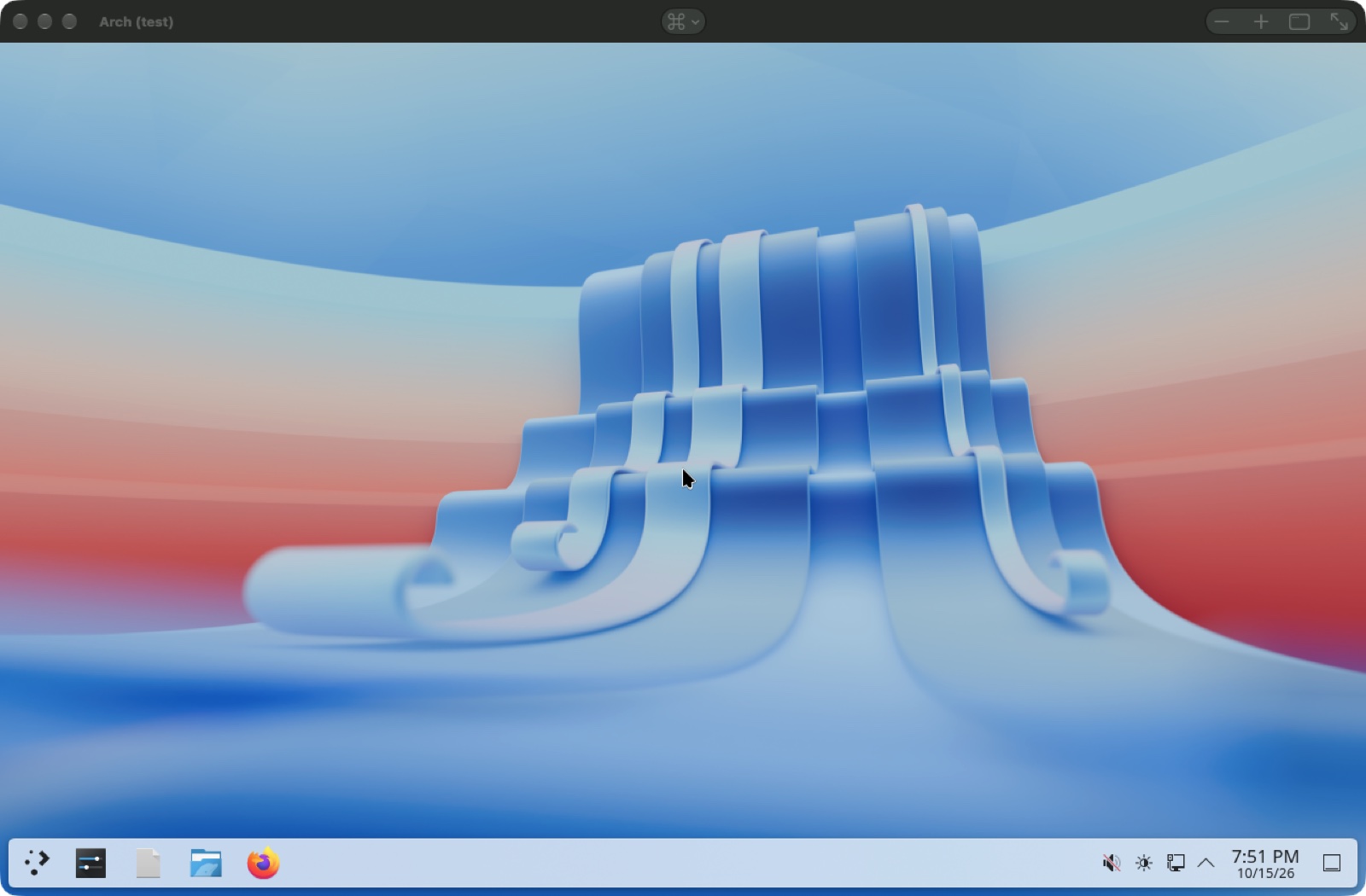
- Signing in: it signs in by itself as
arch, withsudothat asks no password. - Inside: Konsole, Dolphin, Kate and Firefox, with PipeWire sound.
sudo pacman -Syukeeps it current (the snippet Update the system). - Keys: ⌘ stays with the Mac and Option is Plasma's Meta key; Option alone opens the application launcher. Plasma's own shortcuts are Ctrl ones (CtrlShiftC and CtrlShiftV in Konsole). Sending every key to Plasma, ⌘ as Meta, is a choice under Machine configuration › Keyboard.
- The desktop follows the window's size and is scaled for a Retina display.
- Clipboard both ways, text and pictures; the Mac folder at
~/Mac(/mnt/mac). - The ⌘ menu (⌘P): Snippets…, Cloud Folders… and Mount a Share…. Cloud Folders gives the commands to paste once into Konsole; Mount a Share… explains how Dolphin opens
smb://server/share. Snippets build Claude Desktop and OpenAI's Codex desktop app from the AUR.
Add it with + › Arch Linux Machine, File › New Arch Linux Machine or mylinux create arch.

Kali Linux
The security distribution with its own default desktop, Xfce. Kali publishes an installer for arm64 but no ready-made virtual machine, so myLinux builds the image from Kali's own archive (kali-rolling, checked against Kali's archive signing key). It is myLinux's build from Kali's packages, not an official Kali image.
- Signing in: it signs in by itself as
kali, passwordkali;sudoasks none. - Inside: QTerminal, Thunar, Firefox and Kali's top ten tools (
kali-tools-top10): nmap, Metasploit, Wireshark, John the Ripper, Hydra, sqlmap, aircrack-ng, NetExec and Responder. Burp Suite, the tenth, is not built for arm64. The snippet Kali's default tools installs the full set a Kali installation has (kali-linux-default, several GB). - Keys: ⌘ stays with the Mac and Option is Super; Option alone opens the application menu. Kali's own shortcuts are Ctrl ones.
- The desktop runs on X11, drawn in software, follows the window's size and is scaled for a Retina display. The power button shuts down without asking, nothing locks or blanks the screen, and the root filesystem grows to the disk's size at each start.
- Clipboard both ways, text and pictures; the Mac folder at
~/Mac. - The ⌘ menu (⌘P) as Arch's: Snippets…, Cloud Folders… and Mount a Share…, which explains how Thunar opens
smb://server/share.
Add it with + › Kali Linux Machine, File › New Kali Linux Machine or mylinux create kali.
myLinux
Our own small desktop: a Qt Wayland compositor with a macOS-style menu bar and dock, and Omarchy's keyboard-driven workflow and themes. The system runs from memory, so every start is clean. Your home folder and what you install live on a separate apps disk, formatted at the first start in seconds without a download.
- Starting: it starts at its desktop with the menu open.
- Apps install when first opened: press OptionSpace, type claude and press Return, and Claude Code installs and starts. Install in the menu lists Claude Code, Codex, Chromium (also behind the ChatGPT and Claude web apps), Firefox and the developer tools, each marked installed or not. The first of them puts Debian's minimal system on the apps disk once;
claude,codex,gitandapt installthen work in any terminal. - Keys: Option is the Super key and ⌘ stays with macOS. OptionK shows them all, with a search.
- Clipboard: text copied on the Mac pastes inside at once; OptionCtrlC sends what you copied inside to the Mac. Text only.
- The Mac folder at
/mnt/share; cloud folders are mounted at every start and linked as~/Dropboxand so on. - Settings (the gear in its menu bar) keeps OpenRouter, Anthropic, OpenAI and Tailscale keys and a GitHub token, readable by you only, and hands them to every new terminal. Tailscale is built in, behind the dot-grid icon in its menu bar.
- Themes use Omarchy's format; twenty Omarchy palettes come with it.
install owner/repoin the theme picker, ortheme-install https://github.com/owner/repoin a terminal, adds any Omarchy theme from GitHub. - Shutting down: Shut Down… in the menu at the top left of its menu bar, or Shut Down on its page. Closing the window is a power cut.
- Its settings live in
mylinux.iniin its share folder, which your account's Machines tab keeps as a profile.
| OptionSpace, OptionEsc | The menu: Apps, Learn, Trigger, Style, Setup, Install, Remove, Update, About, System. Type to find anything, = for a calculator, install or remove and a package. |
| OptionEnter, OptionShiftEnter, OptionShiftF | Terminal, browser, files |
| OptionW, OptionM, OptionF | Close, minimise, full screen |
| OptionT, OptionJ | Float or tile a window, change the split direction |
| Option1 … Option9 | Switch workspace; with Shift, move the window there |
| OptionCtrlShiftSpace | Theme picker |
| OptionK | Every key, with a search |
| Screenshot into your home folder |
Add it with + › myLinux Machine, File › New myLinux Machine or mylinux create mylinux.

Debian
The latest stable Debian (13, trixie) from Debian's official arm64 cloud image, checked against Debian's SHA512SUMS. No desktop: a server you use through a terminal on the Mac, with a browser beside it that sees inside the machine.
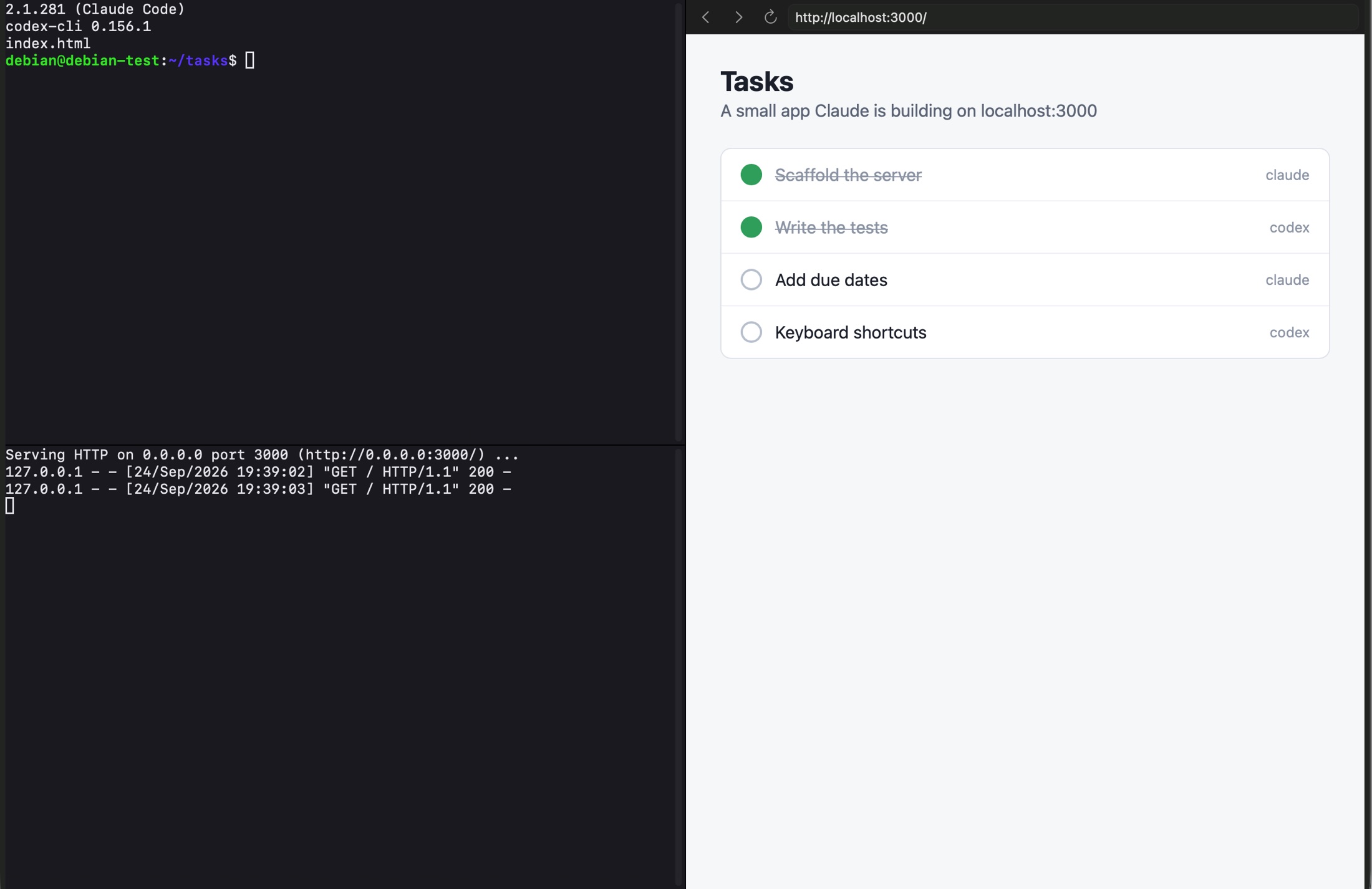
localhost:3000.- Signing in: the account
debian, withsudo. The launcher makes an SSH key for each machine (ssh_keyin its folder) and its terminal logs in with it. A random console password, under Console & diagnostics, is for the serial console when SSH is not up. - Start opens a Ghostty terminal as soon as SSH answers; Terminal opens it again. The page shows the
sshcommand for a terminal of your own, reachable from this Mac only. - Set up at its first start by cloud-init: the machine's name as its host name, and the Mac folder at
/mnt/mac, linked from the home folder as~/Mac. - Apps… (⇧⌘A) installs Claude Code, Codex, Docker, Tailscale, Node.js, Bun, Go, Rust and more; see myLinux Apps. The window's keys, its CMD menu and the browser pane are under Terminals and a browser.
Add it with + › Debian Server, File › New Debian Server or mylinux create debian.

Alpine
Alpine Linux's official aarch64 cloud image, the newest stable release, checked against the .sha512 beside it. The same window, browser pane, Apps… and CMD menu as Debian.
- Signing in: Alpine's own account
alpine(BusyBox ash,doasfor root), with the machine's own SSH key. - Small: it idles in about 60 MB of memory, and SSH answers about 16 seconds after Start.
- Changed at its first boot: sshd allows local forwarding, which the browser pane needs; the share is mounted at every start; the boot menu's countdown is set to 0.
- Claude Code on Alpine needs
libgcc,libstdc++andripgrep; Apps… installs them with it.
Add it with + › Alpine Server, File › New Alpine Server or mylinux create alpine.

Tiny Alpine
Alpine's mini root filesystem (about 4 MB: BusyBox, musl and apk) on myLinux's own kernel, without the cloud image, firmware, boot loader, cloud-init or OpenRC. It is the machine to make many of: one to try something in and throw away.
- Fast: SSH answers about 2 seconds after Start, and Stop takes 2 seconds.
- Small: it idles in about 40 MB of memory and the system is 15 MB on disk; a new 32 GB disk takes about 40 MB of the Mac. With Claude Code, Codex, Bun, btop and Tailscale it is about 770 MB.
- Signing in: the account
alpine, withdoasthat asks no password, and the machine's own SSH key. The first start needs the internet once:apkadds OpenSSH and doas then. - To the launcher it is an Alpine: the same window, menus and snippets.
$ mylinux create tiny --name tester1 --memory 1 --disk 20 --wait
Add it with + › Tiny Alpine Server, File › New Tiny Alpine Server or the command above.
Windows 11
Windows 11 for Arm, running natively on the same accelerated QEMU as the others. Windows is Microsoft's and myLinux does not download it: you download the “Windows 11 (multi-edition ISO for Arm64)” from microsoft.com/software-download/windows11arm64 and give the file to the launcher.
- + › Windows Machine… (or File › New Windows Machine…) opens the new-machine dialog.
- Get Windows… on the machine's page, or Settings › Images & runtime › Windows › Get…, opens Microsoft's page when you want it and takes the ISO you choose. The launcher checks that it is an Arm64 installer, keeps it, and fetches what Windows lacks here: the virtio drivers (877 MB to download, 3 MB kept) and the UEFI firmware.
- Start. With Install Windows by itself on, it installs with no questions in 15 to 40 minutes and restarts into the finished machine.
Without the dialog's answers, the first start is Windows Setup itself, in a window of 1024 × 768 (+ and Fill Screen in the title bar enlarge it):
- Choose “I don't have a product key” (or enter yours), an edition and the one empty disk; Microsoft's licence terms are shown there. Setup restarts by itself on the way.
- The first-run screens come without a network on purpose: choose “I don't have internet” to make a local account. The network comes up when they are over.
- When the desktop is up, a note says to restart: use Machine › Restart in the Mac's menu bar, or Restart on the machine's page, not Restart in Windows's own Start menu.
- A small window of the steps stays beside Windows meanwhile, with the step it is at marked; Show the Steps on the page brings it back.
From then on it is a machine like the other desktops:
- Signing in: with the local account. One made by the dialog without a password signs in by itself.
- The display follows the window (−, +, Fill Screen, full screen, dragging an edge), with twice the pixels and 200 % scaling on a Retina display. There is one pointer, Windows's own.
- Clipboard both ways, text and pictures; sound through the Mac; Caps Lock follows the Mac's.
- Keys: every key goes to Windows, ⌘ as the Windows key and Option as Alt. CtrlOptionG hands the keyboard back to the Mac. Machine configuration › Keyboard can leave ⌘ to macOS, with Option as the Windows key.
- The ⌘ menu: Claude Install…, Codex Install…, Snippets… (PowerShell ones: Claude Code and
cc, Codex andcx, Git, VS Code and Node.js from winget, updates, the Mac's shared folders; Paste goes into Windows Terminal) and Mount a Share…, which explains how File Explorer opens\\server\share. - Not there: a Mac folder inside (share a folder with File Sharing on the Mac and open
\\10.0.2.2in File Explorer), Cloud Folders, Apps…, a TPM and 3D acceleration (the display driver draws in 2D). Windows stays unactivated until you enter a product key of your own.
Add it with + › Windows Machine… or mylinux create windows --iso FILE.
Claude Code and Codex
Every machine can have both coding agents in its terminal. How they get there depends on the kind of machine; the result is the same commands everywhere.
| Omarchy | The dialog's two boxes, or the ⌘ menu's Claude Install…, or mylinux claude NAME --install and mylinux codex NAME --install. Apps… and Snippets… have them too. |
| Windows | The dialog's two boxes, or the ⌘ menu's Claude Install… and Codex Install…, or the same mylinux commands. |
| Debian, Alpine, Tiny Alpine | Apps… (⇧⌘A) › Agents, or Snippets…. An agent using the skill installs Claude Code over mylinux ssh. |
| Arch Linux, Kali Linux | Snippets…: Install Claude Code, signed in and Install Codex. |
| myLinux | OptionSpace, type claude or codex, Return. |
| Any Linux or Mac | curl -fsSL https://mylinux.app/install/claude | sh, signed in with the key saved in your account. |
The commands in a terminal
cc | Claude Code, updated first, without permission prompts |
cx | Codex, without approvals or sandbox |
cc1, cc2, … | Claude Code with one saved subscription each. Each has its own token, kept in ~/.config/mylinux/claude-accounts/ readable by you only, and runs in a subshell, so several subscriptions run side by side. |
gm | Gemini CLI, from myLinux Apps' aliases |
Before the launcher's setup has run in an Omarchy, Omarchy's own cx starts Claude Code and cc is the C compiler. A machine made with the dialog's boxes has the launcher's commands from its first terminal.
Claude Install…
A wizard on the Mac, in the ⌘ menu of an Omarchy or Windows window, that needs no terminal and no browser inside.
- Its first page says what is there: Claude Code and its version, the subscriptions saved as aliases with their account names, how plain
claudeandccare signed in, and whether the status line shows the account. What is missing it offers to install or update. - Add a Subscription… asks for a Claude Code token from
claude setup-token(valid for about a year), an account name for the status line, the alias (cc1, thencc2, …) and, optionally, a myLinux API key (mlx_…) that brings your skills, commands and CLAUDE.md from mylinux.app. Use it for plain claude and the alias cc too makes it the default login. - Then the steps run inside and are shown as they go. The token is not kept on the Mac.
- In Windows it also installs Git for Windows (Claude Code works through it) and Claude's desktop app, pinned to the taskbar once; the aliases are
.cmdfiles and the status line is written in PowerShell.
Codex Install… and the Mac's Codex login
- Codex Install… (Windows) installs OpenAI's Arm64 build of Codex from winget and adds
cx. With Sign Codex in with this Mac's login ticked, the button reads Install and Sign In. - In a Linux machine, the snippet Sign Codex in as on the Mac (or Codex login from the Mac in Apps…) asks the launcher, which asks you on the Mac: Copy Login puts a copy of the Mac's
~/.codex/auth.jsoninto the machine, Don't Copy declines. Codex there then runs as you, on your ChatGPT plan. - The Mac's login must be a file: if Codex keeps it in the Keychain, set
cli_auth_credentials_store = "file"in~/.codex/config.tomland sign in on the Mac again.
The status line
The launcher's setups install mylinux.app's status line for Claude Code: the folder, git branch, lines changed, context, the 5-hour and 7-day limits (with their reset times from 70 %), cost, model and effort, the subscription in use and the session. On its own, with no account: curl -fsSL https://mylinux.app/install/statusline | sh.
myLinux Apps
Apps… (⇧⌘A) in a Debian, Alpine, Tiny Alpine or Omarchy window opens myLinux Apps in the terminal: a list of what can run on the machine, installed ones first, with a search. Inside, mylinux-apps opens it too, and mylinux-apps claude opens it on that search.
- 41 entries in Agents, System, Terminal, Files, Editors, Code and Tools: Claude Code, Codex, Gemini CLI, opencode, Docker, Tailscale, Node.js, Bun, Python, Go, Rust, Neovim, lazygit and more. Return runs a program, or installs it after showing the commands; CtrlR removes one that is only packages. An app a distribution does not package is dimmed.
- Claude Code at the top adds a subscription as an alias, as Claude Install… does: Return runs it, CtrlU takes a new token, CtrlR removes it.
- Aliases turn
cc,cxandgmon or off. - Cloud drives add or take away the Mac's cloud folders; the launcher restarts the machine with them.
- The catalog comes from the repository's main branch each time Apps… opens, so a new entry reaches every machine without a launcher update.
Snippets for the agents
Snippets… on every Linux machine has the agents as ready commands: the cc and cx aliases, an alias per Claude subscription and per Codex account, Install Claude Code, signed in (asks for your myLinux API key), Install Codex, Sign Codex in as on the Mac, Claude Code status line and Your Claude skills and prompts. See Snippets.
The mylinux command
The launcher has a command, made for coding agents as much as for people. It lives inside the app:
$ "/Applications/myLinux Launcher.app/Contents/Resources/bin/mylinux" help
The path has spaces, so call it in quotes, or make a link to it from a folder on your PATH. The command talks to the running launcher and starts it in the background when it is not running (the first time on a Mac that can take a minute, and the command says so). A machine made on the command line is in the launcher's list like any other.
Every command
mylinux kinds | The kinds of machine, and whether each is downloaded |
mylinux list | Every machine and its state |
mylinux create <kind> [--name NAME] [--memory GB] [--disk GB] [--cpus N] [--ssh-port PORT] [--no-start] [--wait [--timeout SECONDS]] [--keys all|mac|none] | A new machine, downloaded when needed, and started. Kinds: tiny (Tiny Alpine), alpine, debian, omarchy, arch, kali, mylinux, windows. --keys is a desktop's keyboard: every key to it, ⌘ kept by the Mac, or as typed. |
windows: --iso FILE | The first time: Microsoft's Arm64 ISO |
windows: --unattended --accept-microsoft-license [--user NAME] [--password PW] [--edition pro|home] [--keyboard nb-NO] | Installs it without a question |
omarchy: --unattended --password PW [--user NAME] [--keyboard Norwegian|nb-NO] [--timezone Europe/Oslo] [--hostname NAME] [--full-name "NAME"] [--email ADDRESS] | Answers its first-start questions: straight to the desktop |
mylinux start <name> [--wait [--timeout SECONDS]] | Start it (downloads what it needs first) |
mylinux stop <name> [--wait] | Shut it down |
mylinux restart <name> | Shut it down and start it again |
mylinux status <name> | Its state; "ready" is true when it can be used |
mylinux wait <name> [--timeout SECONDS] | Until it is ready (default 900 seconds) |
mylinux ssh <name> [-- command…] | A server's shell, or one command in it (tiny, alpine, debian) |
mylinux claude <name> | Claude Code inside an Omarchy or a Windows machine: what is there |
mylinux claude <name> --install [--token-file FILE --token-name NAME --account WORD [--alias cc1] [--default|--not-default]] | Installs what is missing (in Windows the desktop app too). With a token, named by the file of NAME=value lines it is in and its entry there, a subscription is added: the launcher reads the token; it is never given. |
mylinux codex <name> | Codex inside it: what is there |
mylinux codex <name> --install [--login-from-mac] [--desktop --accept-store-terms] | Installs Codex and the alias cx; signs it in with this Mac's own Codex login; in Windows, OpenAI's desktop app from the Microsoft Store |
mylinux delete <name> --yes [--stop] | The machine and its disk, into the Trash (--stop shuts it down first) |
mylinux erase machines --yes [--stop] | Every machine and its disk, into the Trash; the downloaded systems stay |
mylinux erase everything --yes [--stop] | As a new install: the machines, the downloads, the settings, the saved remote passwords and macOS's permissions. The data folder goes to the Trash and the launcher starts again. |
mylinux skill install [--agent claude|codex|all] | The skill that teaches a coding agent these commands |
mylinux skill show | path | The skill's text, or where it is |
mylinux version, mylinux help | The launcher's version and path; this list |
- Sizes are whole gigabytes:
1,1g,20gb. Sizes left out are the kind's own;mylinux kindslists them. - A name with spaces goes in quotes. A name left out is the kind's (
Omarchy, thenOmarchy 2), and the answer says it. - Without
--yes,deleteanderasesay what would go. With machines running they refuse and name them;--stopshuts them down first. - A server started by the command opens no terminal window.
Waiting
create and start answer at once. --wait, or mylinux wait, holds on until the machine is ready: a server when its SSH answers, a desktop when it runs, an Omarchy made with --unattended when its desktop is up, Windows when it is installed and signed in. A first Omarchy, Arch or Kali needs a download and an unattended Windows installs for a while, so give those --timeout 3600. When the wait runs out, nothing is wrong: the work goes on, and status says where it is.
JSON answers
Every answer is JSON on standard output, but for ssh (the command's own output and exit status), help and skill show (text). An answer has "ok": true, or "ok": false and an "error" in plain words.
state | stopped, downloading, starting, running, stopping or failed (with error) |
ready | True when the machine can be used; a machine can be running and not ready yet |
job | While it downloads or starts: its phase, what (also when macOS is asking you something on the Mac's screen) and progress |
name, id, kind, title, memoryGB, diskGB, cpus, folder | The machine and its settings; folder holds its disk, and its Mac subfolder is ~/Mac inside a server |
ssh | For a server: host, port, user, key, argv, command and ready |
windows, omarchy | How far an install or a first-start setup is, with a note in words |
| Exit status 0 | It went well |
| 1 | It did not; the JSON says why |
| 2 | The command was not understood |
| 3 | The launcher could not be reached |
| 4 | A wait ran out; the work goes on |
An example session
$ mylinux create tiny --name tester1 --memory 1 --disk 20 --wait
{
  "machine" : {
    "cpus" : "automatic",
    "diskGB" : 20,
    "kind" : "tiny",
    "memoryGB" : 1,
    "name" : "tester1",
    "ready" : true,
    "ssh" : {
      "host" : "127.0.0.1",
      "port" : 2223,
      "ready" : true,
      "user" : "alpine",
      …
    },
    "state" : "running",
    "title" : "Tiny Alpine",
    …
  },
  "ok" : true
}
$ mylinux ssh tester1 -- 'doas apk add git && git --version'   # the command's own output and exit status
$ mylinux delete tester1 --yes
{
  "error" : "\"tester1\" is running: add --stop to shut it down first (mylinux delete \"tester1\" --yes --stop). Nothing was deleted",
  "ok" : false
}
$ mylinux delete tester1 --yes --stop   # shut down, then into the Trash with its disk
The answers above are shortened where they show ….
The agents' skill
A skill teaches Claude Code and Codex the mylinux command: its path, how to turn a sentence into a command, to wait and report, and what not to do unasked.
- Install it with File › Install the Agents' Skill…, or
mylinux skill install. It goes where each agent on this Mac keeps its skills:~/.claude/skills/mylinuxand~/.codex/skills/mylinux(--agent claudeor--agent codexfor one). - The launcher keeps an installed skill the same as its own copy each time it starts, so a newer launcher's commands reach it.
- A session that was open before the skill was there may have to be started again to know it.
$ mylinux skill install
# then, in Claude Code or Codex:
/mylinux install tiny alpine 1gb/20gb called tester1
Things to ask
- install tiny alpine 1/20 called tester1 and put claude code on it
- make me a debian box named build with 4 GB
- install omarchy with claude code and codex
- run uname -a in tester1
- is tester1 up
- what does my windows machine have of claude and codex
- what machines do I have
- delete tester1
“1gb/20gb” is memory, then disk. A size left out is the kind's own; a name left out is the kind's, and the agent tells you the name the machine got.
What it will not do
- Ask you to paste a token, or print one. A Claude subscription is named by its file and entry (
--token-file,--token-name), and only when you have said which. - Invent a password or repeat one back. If Omarchy is wanted without its questions and no password was given, it asks you.
- Accept Microsoft's licence terms or the Microsoft Store's for you: it passes
--accept-microsoft-licenseor--accept-store-termsonly when you have said so in the conversation. - Copy your Mac's Codex login into a machine unless you asked for that.
- Delete a machine you did not name and ask to have deleted, or erase all machines or everything without words that leave no doubt. It says that the Trash can give them back.
- Stop or restart a machine it did not start, unless you ask: you may be working in it.
- Make a second machine under another name when the name you gave is taken: it asks.
- Print a machine's SSH key path, or the key, unless asked.
With your Mac
The machines share the Mac's clipboard and folders, use its windows and keys, and sit beside your other computers. Each part below says where to find it.
Clipboard
- Omarchy, Arch Linux, Kali Linux and Windows: text and pictures, both ways, through a clipboard agent inside.
- myLinux: text copied on the Mac pastes inside at once; OptionCtrlC sends what you copied inside to the Mac.
- Servers: the terminal is a Mac window, so ⌘C and ⌘V work as anywhere on the Mac.
- Machine configuration › Keyboard › Share the Mac clipboard turns it off for a desktop.
The Mac folder
Each machine has a folder of its own on the Mac, beside its disk, shown inside. Files & sharing › Share folder on its page picks another.
| Omarchy | ~/Mac, or the folder's own name when you chose another |
| Arch Linux, Kali Linux | /mnt/mac, with ~/Mac pointing to it |
| Debian, Alpine, Tiny Alpine | /mnt/mac, linked from the home folder |
| myLinux | /mnt/share |
| Windows | None: share a folder with File Sharing on the Mac (System Settings › General › Sharing) and open \\10.0.2.2 in File Explorer |
Cloud Folders
The Mac's Dropbox, OneDrive, iCloud Drive and Google Drive inside a machine, as ~/Dropbox, ~/OneDrive, ~/iCloud and ~/GoogleDrive. The Mac's own apps keep them in sync, so there is nothing to sign in to inside; online-only files download when first read.
- Open it with Cloud folders › Choose… under Files & sharing, ⇧⌘P or the ⌘ menu's Cloud Folders… in a desktop's window, or Cloud drives in myLinux Apps.
- Mac folders › Add Folder… shares any folder on the Mac, a project or a disk, as
~/and its name, read and written from both sides. The whole disk, the home folder, system folders and the Library are refused. - Folders are attached when a machine starts, so saving a change restarts a running machine (Save and Restart).
- Debian, Alpine, Tiny Alpine and myLinux get them mounted by the launcher at every start. In Omarchy, Apps… › Cloud drives mounts them with your password; Omarchy, Arch and Kali also get commands to paste once into a terminal inside. Windows has none.
Mount a Share…
An SMB share from this Mac, a NAS or another computer as a folder in your home inside, now and at every start. It is in the CMD menu of a Debian or Alpine window and the ⌘ menu of Omarchy's.
- The dialog starts at this Mac as the machine sees it (
10.0.2.2) and offers its own shares, saying when File Sharing is off. The Server menu lists the file servers the Mac finds on the network, with their addresses; any other address can be typed, a Tailscale one included when the Mac runs the Tailscale app. - The share's password is asked in the machine's terminal and never passes through the Mac; sudo asks once. The share is kept in
/etc/fstab, and a start does not wait for a NAS that is off. - In Arch, Kali and Windows the item explains how their file manager opens a share instead (
smb://server/sharein Dolphin or Thunar,\\server\sharein File Explorer). myLinux does not have it yet.
Snippets
Ready commands for each system, with a name and a line about each: aliases, installers and updates. They are in the ⌘ menu of a desktop's window, the CMD menu of a server's, and the CMD menu of a remote VNC desktop (a set of its own).
- View shows one, Copy puts it on the clipboard, and Paste puts it at the prompt of the machine's terminal in front, waiting for Return, and closes the Snippets window.
- + adds one of your own for that system, kept by the launcher on this Mac; yours can be edited and deleted.
- The built-in ones come from the repository's main branch, so a new one reaches every launcher; without GitHub, the app's own copy is used.
A desktop's window and its keys
A desktop's title bar has the ⌘ menu in the middle and four buttons on the right: 10 % smaller, 10 % larger, Fill Screen (the whole screen below the menu bar; pressed again, the size before) and full screen. The window opens filling the screen; Screen under Machine configuration picks a size instead. In full screen a small floating box carries the menu and an exit button.
| ⌘P | The ⌘ menu, while ⌘ stays with the Mac. With every key going to the machine, click the ⌘ in the title bar. |
| ⇧⌘A | Apps… in Omarchy, also with every key going to it |
| ⇧⌘P | Cloud Folders…, also with every key going to the machine |
| ⌃⌘F | Full screen on and off, in every keyboard mode |
| CtrlOptionG | With every key going to the machine: the keyboard back to the Mac. Again, or a click in the window, gives the machine every key. |
- Machine configuration › Keyboard has three modes: Option (macOS keeps its ⌘ shortcuts and Option is the machine's Super, Meta or Windows key), Command (every key goes to the machine, ⌘Tab and ⌘Space included) and None. Omarchy and Windows start with every key, Arch and Kali with Option.
- Sending every key needs macOS's Accessibility permission for myLinux Launcher, asked the first time.
- Settings › Windows › Open the window on the screen it was sized for moves a desktop's window to the display it was made for; macOS asks once for permission to control System Events.
- A window can be dragged to another display; Windows changes its scaling to match.
Terminals and a browser for servers
A Debian, Alpine or Tiny Alpine machine opens in Ghostty, a fast terminal drawn on the Mac's GPU, as the machine's own app. A line at the top of the window lists its keys, and its Commands menu types common commands: the agents, btop, disk space, memory, network addresses and listening ports, updating and installing packages, the Mac folder and Dropbox, and Tailscale.
| ⌘P | The CMD menu in the middle of the title bar |
| ⌘Space, ⌥Space | Find and Run: search the programs installed on the machine (type “cla”, get Claude Code); Return types the command. ⌘Space works only while a server's window is in front and with the Accessibility permission; Settings › Terminal turns it off. |
| ⇧⌘A | Apps…: myLinux Apps in the terminal |
| ⌘Return | Split: one more terminal in the tab |
| ⇧⌘Return | The browser pane, with its address bar ready |
| ⌘T | Another tab to the machine |
| ⌘W | Close the pane with the keyboard: the browser, or one terminal of several; with a single terminal, the window |
| ⌘+, ⌘− | Text size |
| ⌘K | Clear the terminal |
| ⌘-click | Open a link from the terminal in the browser pane (the Claude login address, say) |
- The browser pane's traffic goes through a tunnel into the machine, so it sees the network as the machine does:
localhost:3000is the app running inside. - The CMD menu also has Snippets…, Mount a Share…, Open Last URL in Browser (the last address in the scrollback), Screenshot Browser to Machine and Paste Screenshot Path, which save a picture of the page, or of the Mac's clipboard, into the machine and type its path, so an agent inside can look at it.
- One tab can hold Claude Code in one terminal, Codex in another and the result in the browser beside them. When the machine restarts, the terminals reconnect.
Remote VNC and SSH
The sidebar's Remote group opens your other computers as native Mac windows: + › VNC Desktop or + › SSH Terminal, then fill in the host, port and user.
- VNC: Tight and ZRLE, with Fast, Balanced or Best picture quality, and VeNCrypt TLS with a user name and password (wayvnc on Omarchy, for one). The first connection shows the server's certificate and its SHA-256 fingerprint; trusted once, it is pinned.
- A VNC window's toolbar: Launcher (the launcher in front of a desktop that fills the screen), Fill Screen, Full Screen, Fit, zoom out and in, 1:1, Keyboard and Grab keys. Pinching zooms too. A VNC desktop seen for the first time opens filling the screen.
- Keyboard, per connection: Mac keeps its shortcuts, Option is Super, or Everything to the remote (the default for VNC: ⌘Tab and ⌘Space included, with the Accessibility permission). A list of shortcuts can stay with the Mac in every mode.
- The CMD menu in the middle of a VNC window has Snippets… of its own; ⌘P opens it even while every key goes to the remote.
- SSH runs the Mac's own
sshin Ghostty: your keys and agent work as in Terminal, a saved password comes from the Keychain, and a tmux session name attaches at login, so the shell survives a closed window. - Remote windows open when the launcher quits come back at the next start. Passwords live in the Keychain, profiles in
~/Library/Application Support/myLinux/remote.json. + › Import from machines.json… takes the machines saved in myLinux's own viewer.
| ⌥⌘G, or CtrlOptionG | Switch the keyboard between the remote and the Mac; the window's title says where the keys are |
| A click in the picture | Every key to the remote again |
| ⌃⌘F | Full screen, in a space of its own |
| Menu bar item › Release Keyboard to the Mac | The way back with the mouse when a window holds every key |
The launcher's menu bar item also has Machines…, Quick Connect…, Remote Machines, Close Remote Windows and Quit myLinux Launcher.
Tailscale
The dot-grid button beside + above the sidebar lists the machines of your tailnet, from the Mac's own Tailscale client (no API key): name, IP address, system and when each was last seen, each with a VNC and an SSH button, so a tailnet machine needs no profile.
- A Mac that is signed out signs in from there, in the browser; one where Tailscale is off gets Turn On.
- Right-click a machine for VNC as… and SSH as… (another user name), Add VNC Desktop to the Sidebar, Add SSH Terminal to the Sidebar and Copy IP Address. A user name is asked the first time and remembered; a password ticked Remember goes to the Keychain.
- A Mac whose Tailscale runs in userspace mode cannot reach tailnet addresses itself; the launcher then connects through
tailscale nc.
Quick Connect and links
- ⌘K (File › Quick Connect…, also in the menu bar item) opens a field over everything. Type part of a machine's name or host, pick with ↑ and ↓, and Return opens it (a remote desktop or terminal) or starts it (one of your machines). Escape closes it.
open mylinux://vnc/<name>andopen mylinux://ssh/<name>open a remote machine from Shortcuts or a script;mylinux://remote/<name or id>takes either kind.
Updates and storage
The launcher updates itself, and keeps every Linux as downloaded so a new machine needs no second download.
The launcher
- It looks for a newer version shortly after it starts and every six hours. When one is out, the toolbar shows Update to and the version; Settings › Updates has the notes and Check for Updates.
- The update is downloaded, checked against its SHA-256 and for the same developer's signature, put in place of the running app and opened.
- The new launcher takes over from the old one: the old one hands over its windows and quits, and your machines keep running through it. One launcher runs at a time; opening another copy hands over the same way.
Images and the runtime
- Settings › Images & runtime lists each Linux with its size and version and an Update or Download button. An update is used by machines made from then on; existing machines keep the disk they have.
- The Windows row takes or changes the ISO (Get…, Change…). Once every Windows machine is installed, the ISO is no longer needed.
- The QEMU row has Check for update. A machine uses a new runtime from its next start, or after Restart.
Saved downloads
Each Linux is kept as downloaded, in ~/Library/Caches/dev.mylinux.downloads, so a machine of that kind installs again in seconds without a download, also after Clear All Data. The saved copies share disk space with the installed ones. When a newer version is out than the saved one, the launcher asks: Download Newer, Use Saved and the Linux's name (Use Saved Omarchy, say), or Cancel.
Settings › Storage
- The data folder,
~/Library/Application Support/myLinux, with Show in Finder, and the space each part takes: every machine, every installed Linux, the QEMU runtime and the logs. - Saved downloads: each with its version and size, Show in Finder and Remove Saved Downloads…. Installed Linuxes and machines stay; the next install of a Linux downloads it again.
- Start over › Clear All Data on This Mac… deletes the machines and their disks, the installed Linuxes and QEMU, the launcher's settings, saved remote passwords, the browser's data and macOS's permissions, and restarts the launcher as new. The saved downloads stay. It cannot be undone;
mylinux erase everything --yesdoes the same with the data folder moved to the Trash instead.
Settings also has Terminal (Find & Run with ⌘Space), Windows (window placement) and Developer (a source checkout to run from; see Build it yourself).
The mylinux.app account
An account on this site keeps what your machines fetch when they are set up: your keys, your Claude Code setup, and profiles for myLinux machines. Sign in or sign up at mylinux.app/app. In the launcher, the globe in the middle of the toolbar opens it in a window of its own, with back, home, reload and open-in-the-browser; the sign-in lasts. The account has three tabs: API, Claude and Machines.
API: saved keys and API keys
- Install with one line: save your Claude Code token (or an Anthropic API key), create an API key, and run
curl -fsSL https://mylinux.app/install/claude | shin the new machine. - Saved keys are what installers fetch with an API key: a Claude Code token (
CLAUDE_CODE_OAUTH_TOKEN, fromclaude setup-token, lasts a year and uses your Claude subscription), an Anthropic API key, an OpenAI API key, a Gemini API key, a GitHub token, or Other… under any name likeMY_SERVICE_TOKEN. - A Claude key is named after its subscription; the name goes to the machine as
MYLINUX_CLAUDE_ACCOUNT, which the status line shows. - Saved keys are kept encrypted (AES-256-GCM, bound to your account and the key's name) and the page never shows them: Copy puts one on the clipboard, and Rename, Replace and Delete manage it. Each shows its last four characters and when an installer last read it.
- API keys (
mlx_…) let an installer or a script use the account: fetch your saved keys and Claude files, read and write machine profiles. One is shown once when it is made, and the site keeps only a hash of it. Each shows when it was last used; Revoke ends it.
Claude: prompts and files
- Prompts say in your own words what Claude Code should set up on each machine; Claude Code does it the way that machine needs (macOS, Debian, Alpine and Omarchy differ) and installs what it takes. On a machine where the installer has run once, type
/mylinuxin Claude Code, or/mylinux status linefor one prompt. Every account starts with a status-line prompt. - Files for ~/.claude/: CLAUDE.md, agents (
agents/<name>.md), commands (commands/<name>.md), skills (skills/<name>/SKILL.mdand their other files),settings.json,statusline.sh, hooks and scripts. Paste one or use Open file…. They are kept encrypted like the saved keys. - The installer writes them into
~/.claude; run it again after a change. A file the machine had already, and that differs, is kept once as<name>.before-mylinux. Scripts are made executable, and the tools they call (jq, git, bash, python3 and others) are installed.
Machines: myLinux profiles
One profile per myLinux machine, the same as the mylinux.ini in its share folder: desktop scale, text scale, brightness, terminal font size, keyboard layout (English (US), Norwegian, Icelandic), theme and background, the apps that open at start, the Debian packages you added (a reminder for install on a new Mac) and notes. Other ini sections are kept as imported. Import mylinux.ini takes a pasted file; Download mylinux.ini gives one to put in a machine's share folder before it starts.
The installers
curl -fsSL https://mylinux.app/install/claude | sh | Claude Code installed and signed in with your saved Claude Code token (else your Anthropic API key), with no login screens, plus everything /install/skills does |
curl -fsSL https://mylinux.app/install/skills | sh | For a Claude Code already signed in: the Claude tab onto the machine, /mylinux for your prompts, and the tools your files call |
curl -fsSL https://mylinux.app/install/statusline | sh | The status line on its own; no account or API key |
curl -fsSL https://mylinux.app/install | The installers, described in words |
curl -fsSL https://mylinux.app/claude | sh | No account: installs Claude Code and asks for a token from claude setup-token |
- They are plain
sh, so they run on Debian, Alpine, Arch and Omarchy, and macOS. Download one and read it first if you like. - The first two ask for your API key once and keep it in
~/.config/mylinux/api-key(readable by you only) for the next run. - Where no terminal can ask, pass the key in the environment, with a space first so it stays out of the shell history:
$ MYLINUX_API_KEY=mlx_… sh -c "curl -fsSL https://mylinux.app/install/skills | sh"
HTTP API
The account answers JSON at https://mylinux.app/api/. Send an API key from the API tab as a bearer token: Authorization: Bearer mlx_…. Machine profiles are addressed by name or by id.
GET /api/health | {"ok": true}; no key needed |
GET /api/me | Your user id and name, and whether you came by key or by the website |
GET /api/machines | Your machine profiles |
POST /api/machines | {"name": "macbook", "config": {…}} makes one; 409 when the name exists |
GET /api/machines/<name> | One profile |
PUT /api/machines/<name> | {"name": …, "config": …} renames it or replaces its profile |
DELETE /api/machines/<name> | Deletes it |
GET /api/machines/<name>/ini | The profile as mylinux.ini text |
PUT /api/machines/<name>/ini | An ini file as the body; makes the machine when it is not there. Bad values keep the stored ones and are listed in "problems". |
GET /api/tokens | Your API keys: names, first characters, when made and last used |
GET /api/keys | Your saved keys: names, labels, last four characters, when saved and last read; never the values |
GET /api/keys/<NAME>/value | One saved key's value as plain text, its label in the x-mylinux-label header |
GET /api/claude/files | The Claude tab's files; ?format=paths gives one path per line, prompts left out |
GET /api/claude/file?path=<path> | One file's content |
GET /api/claude/prompt | Your prompts as one Markdown text for Claude Code; ?only=<name> for those whose name matches |
- Making and revoking API keys, and saving, renaming or deleting saved keys and Claude files, are done on the website only; with an API key they answer 403.
- Errors are JSON with an
"error": 400 for a bad request, 401 without a valid key, 404 for nothing there, 409 for a name taken or a limit reached, 413 for a body too large, 422 for an invalid profile (with"problems"). - Limits: 50 machine profiles, 20 API keys, 30 saved keys and 100 Claude files of up to 256 KB each. A saved key's value is one line of up to 8 KB, under a name of capitals, digits and
_.
$ export MYLINUX_API_KEY=mlx_…
$ curl -fsS -H "Authorization: Bearer $MYLINUX_API_KEY" \
    https://mylinux.app/api/machines/macbook/ini -o share/mylinux.ini
$ curl -fsS -X PUT --data-binary @share/mylinux.ini \
    -H "Authorization: Bearer $MYLINUX_API_KEY" \
    https://mylinux.app/api/machines/macbook/ini
$ curl -fsS -H "Authorization: Bearer $MYLINUX_API_KEY" \
    https://mylinux.app/api/keys/GITHUB_TOKEN/value   # a saved key, as text
Build it yourself
Everything is in the source repository. The launcher runs the same scripts you can run from a checkout.
Run machines from a checkout
$ git clone https://github.com/adminmylinux/mylinux.git && cd mylinux
$ tools/get-qemu-runtime.sh   # myLinux's own QEMU into out/qemu-runtime (or: brew install qemu)
$ tools/get-image.sh          # the latest myLinux kernel and root filesystem into out/, SHA-256 checked
$ ./run.sh
./run-omarchy.sh (with DESKTOP=arch or DESKTOP=kali for the other desktops), ./run-debian.sh, ./run-alpine.sh, ./run-tiny.sh and ./run-windows.sh start the others, after the matching tools/get-*.sh. The scripts take their settings from the environment; some for run.sh:
RES=1600x1000 | The guest's resolution; by default the screen below the menu bar |
MEM=8G | Memory |
APPS_IMG=path, SHARE_DIR=path | The apps disk, and the folder shared as /mnt/share |
GRAB=opt|full|none | Which keys the guest takes; full includes ⌘Tab |
MOUSE=tablet|relative | relative captures the pointer on a click until CtrlOptionG |
MYLINUX_QEMU=brew|runtime | Which QEMU |
RENDER=soft, CLIPBOARD=0 | Software GL in the guest; no shared clipboard |
DRYRUN=1 | Print the QEMU command instead of starting it |
Build the myLinux image
Building needs OrbStack with a Debian machine named debian, because Buildroot wants a case-sensitive filesystem. The build tree lives inside Debian at ~/br; the repository stays on the Mac.
# inside orb -m debian
$ sudo apt install -y build-essential git cmake ninja-build python3 rsync bc wget cpio unzip file \
    libncurses-dev libssl-dev bzip2 xz-utils zstd perl-modules ccache gawk texinfo patch
$ mkdir -p ~/br && cd ~/br && git clone --branch 2026.08 --depth 1 https://gitlab.com/buildroot.org/buildroot.git
$ mkdir -p ~/br/output ~/br/dl
# on the Mac, in the repository
$ tools/buildroot-patch.sh
$ orb run -m debian sh -c "cd ~/br/output && make O=\$PWD BR2_EXTERNAL=$PWD -C ~/br/buildroot mylinux_defconfig"
$ ./build.sh                 # first build about an hour on 13 cores, later builds minutes
$ tools/sdk-update.sh        # once: export the SDK for the fast shell loop
$ tools/app-build.sh shell   # builds the desktop shell into share/, picked up at the next shell restart
The Arch Linux and Kali images are built the same way, as root in the OrbStack machine: orb -m debian sudo bash tools/build-arch-image.sh and tools/build-kali-image.sh.
Build the launcher
$ mac/build-app.sh --install # out/mac/myLinux Launcher.app, copied to /Applications
- It needs Xcode's Swift, and libvncclient: the copy
tools/build-libvncclient.shbuilds for macOS 15, or Homebrew'slibvncserver. The Ghostty terminal package is fetched bytools/get-ghosttykit.sh, pinned and checked. - A local build is signed ad hoc, so on another Mac Gatekeeper wants a right-click › Open once. A release is
mac/release.sh --notarize <profile>: a notarised DMG with the QEMU runtime inside. - Settings › Developer points the launcher at your checkout, and machines then start from its
run.sh,tools/andout/. tools/check.shruns the checks and tests;PLAN.mddocuments every design decision.
Licence
myLinux is free software under GPL-3.0-or-later, with its source on GitHub.
- The myLinux desktop shell links the Qt Wayland Compositor module, which Qt offers under the GPL v3 only. Its theme palettes are Omarchy's (MIT); the Inter font is under the SIL OFL.
- The terminal is Ghostty's (MIT), through GhosttyKit (MIT). myLinux Apps is made with Textual (MIT). VNC is libvncclient's (GPL-2.0-or-later). The QEMU runtime lists its sources and licences in its
NOTICES.md. - The Welcome sheet shows the Debian Open Use Logo (Software in the Public Interest, Inc., LGPL-3 or CC-BY-SA 3.0) and the Omarchy mark from Omarchy's brand kit.
- Omarchy is by its own authors and comes from the Try Omarchy project's signed release. Arch Linux, Kali Linux, Debian and Alpine Linux are trademarks of their projects, and Windows is Microsoft's: it needs your own licence from Microsoft to be activated.